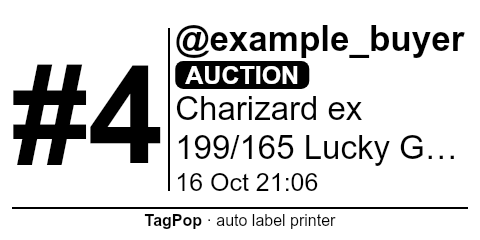
TagPop watches your Whatnot show and prints a buyer-numbered label on your thermal printer the second someone wins or buys — so you sell, and packing sorts itself.
Start your 7-day free trial£34/month after the trial · cancel any time · no charge if you cancel during the trial
Set it up once in about 10 minutes. After that it just runs in Chrome next to your show.
Add TagPop to Chrome and install the small print helper on your Mac or Windows PC. A guide walks you through every step.
Pick your label printer and size, print a test label and fix anything with plain buttons like "cut off on the left".
Open your show. Every win, buy and giveaway prints straight away with the buyer's number — the same number all show long.
Built and tested on real UK shows.
Each buyer keeps one number for the whole show. Pack everything with the same number in one bag.
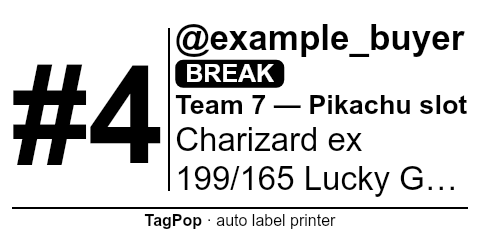
Break labels wait for the spot to be assigned. Respin after printing? A "CORRECTED" label prints automatically.
£ prices, mm label sizes (50×25, 60×30, 4×6 and more) and Royal-Mail-friendly packing lists.
Failed payment or cancelled order? A clear "PAYMENT FAILED" or "VOID — do not ship" label prints.
One press stops everything and clears the printer queue. Nothing ever prints twice.
Everything runs on your computer. Your buyers' details never reach our servers.
Chrome on a Mac (macOS 12+) or Windows 10/11, plus a thermal label printer. Tested with MUNBYN and designed for the common thermal printers sellers use (Zebra, Rollo, Brother and similar) — the free test label tells you in seconds.
After the show: a buyer list (by number or A–Z to match Whatnot's shipping labels), printable on A4 or 6×4, and a spreadsheet export. Reprint any label with one click.
Unlimited labels. No per-label fees.
after a 7-day free trial
Card needed to start. Nothing is charged for 7 days — cancel before then and you pay nothing.
Any thermal label printer that works on your computer should be fine — most sellers already have one for postage labels. TagPop sets the label size itself, so it won't mess up your Royal Mail settings.
No. TagPop only reads what your own show page already receives in your browser. It never clicks, bids, posts or messages anyone.
They stay on your computer. Our servers only ever see your licence key and which computers use it — see our Privacy Policy.
Printing carries on. TagPop checks your subscription in the background and works for up to 3 days offline.
Yes. Your subscription covers 2 computers; switch "This computer prints labels" on the one that should print.
In TagPop: More → Subscription → Manage subscription → Cancel. You keep TagPop until the end of the period you've paid for (or the trial). See cancellations & refunds.
No — TagPop is an independent tool made by a UK seller for sellers. You're responsible for following the rules of the platforms you sell on.